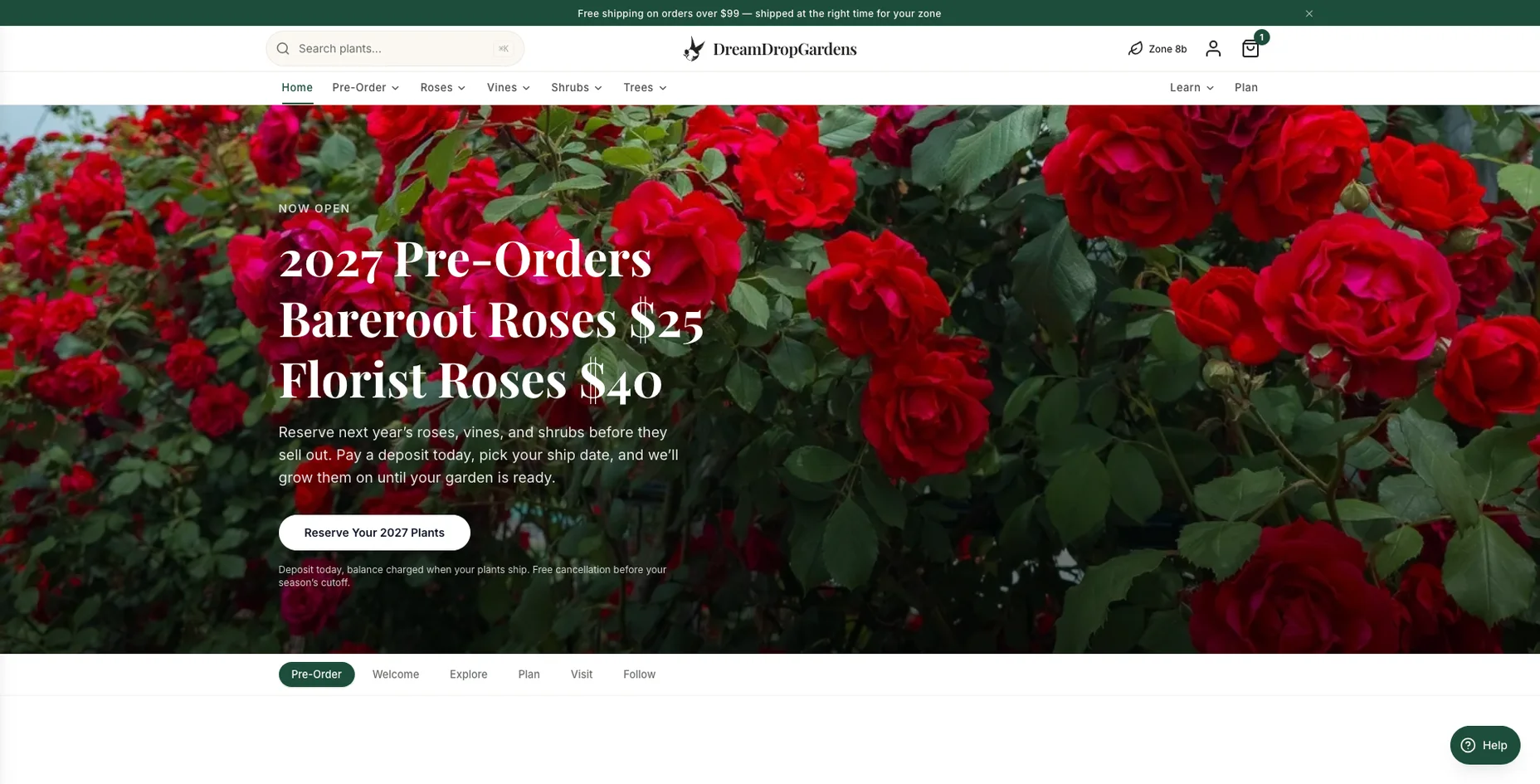

Built for plants
Browse by family, species, type, and attribute, with filters a gardener cares about.
Case study · Headless Shopify
We kept an existing Shopify store as the backend and built a new plant-nursery brand in front of it — with seasonal pre-orders, deposits charged on Stripe, and plant data a gardener can actually filter by.
Plant listings from several wholesale growers
Deposit at checkout, balance charged when the plant ships
Two brands running on one Shopify store
Environments — Test, Staging, Production — deployed from GitHub
At a glance
Where we started
Realmdrop.com was meant to be a department store — many departments under one roof, on a standard Shopify theme. As the catalog grew, the theme's limits shaped the store more than we did.
Shopify navigation is a simple nested list. With dozens of departments, shoppers couldn't browse — only search.
A search for a rose might return a garden hose, a planter, and a gift item, with little control over ranking or grouping.
Price and availability, yes. Hardiness zone, bloom colour, mature size, or thornless canes needed app configuration — and still fell short.
A plant, a phone case, and a kitchen tool shared one product page, with no room for what a gardener needs.
Most of Realmdrop's volume came through marketplaces like Amazon and eBay, and most on-site sales came from Google and Bing Shopping ads. Shoppers landed on one product, bought it, and left. Few people browsed the store as a destination.
The garden didn't fit
We wanted customers to commit with money at order time — while everyone understands fulfillment happens later.

The decision
Instead of forcing the garden department into Realmdrop's theme, we gave it its own brand, DreamDrop Gardens, with a storefront built from scratch.
We deliberately kept the same Shopify store behind it. Products, inventory, orders, and customers stayed where they were, and every sales channel already connected to that store kept working.
Goals
Browse by family, species, type, and attribute, with filters a gardener cares about.
Seasonal programs, stock caps per variety, and clear ships-now vs. ships-later messaging.
Deposit or pay in full at checkout; balance at ship time; review before money moves.
Shared store, inventory, and order history — without either brand's rules leaking into the other.
Kept outside Shopify, so bad supplier data is fixed once and pushed everywhere.
Mobile first, with a catalog of more than a thousand products.
Another store can be stood up through configuration, not a fork.
Architecture
The storefront is a server-rendered web app that handles everything a shopper sees: browsing, filtering, search, cart, checkout, and accounts. A staff admin panel lives in the same app behind its own login.
Shopify stays the system of record and serves every image from its global CDN. Stripe handles cards. Only the staff admin talks to Plantaerium — public pages read a copy already synced into Shopify.
It runs in Docker on our own server, with Test, Staging, and Production deployed automatically from GitHub.
Shopper
DreamDrop storefront
Custom server-rendered React app + staff admin
Shopify
Stripe
Plantaerium
Challenge 01 · Pre-orders
Shopify has no idea of seasons, allocations, or deposits. Our first model fought that; the second one worked around it.
“Available” meant ships now; “incoming” meant this season's allocation. Great for shoppers — but Shopify's cart needs “continue selling when out of stock,” and that setting is global. Pre-order plants became buyable, uncapped, on every other channel: Realmdrop.com, Google Shopping, Shop, Facebook.
Every variant is set to “do not oversell” on every channel. The DreamDrop cart knows the pre-order rules and prices through Shopify's draft-order calculation, so tax, discounts, and shipping still come from Shopify. Pre-orders are storefront-only by design.
Shopify won't complete a draft for stock that's only incoming — we learned that when the first pay-in-full pre-orders failed after the card was authorized. They now wait as drafts like deposits do, and any failure at that step alerts the owner.
The opposite failure happened too: products imported without the oversell setting couldn't be added to a cart at all. One morning, more than 300 newly opened clematis pre-orders were quietly unbuyable until we caught it.
How a pre-order moves today
Our own cart checks each line against the live allocation.
Checkout creates a Shopify draft — not a real order.
Stripe authorizes the deposit or full amount and saves the card.
The owner confirms the harvest before money moves.
The hold is captured — or released if the harvest falls short.
The draft becomes a real Shopify order and the balance is charged.
Challenge 02 · Payments
Shopify's checkout couldn't express what we needed, so the storefront manages payments on Stripe directly.
Pay 50% now and the rest at ship time, or pay everything up front.
With consent at checkout, the card is kept on file. No ignored invoices, no re-entering a card months later.
If a harvest falls short, the hold is released rather than refunded — no charge-and-refund for the customer, and far fewer lost fees. Configurable per order type.
Authorizations expire after about seven days, so the admin panel surfaces holds close to expiring.
Each Stripe payment records its Shopify order, and each order records its payment.
A phone and email alert the moment a pre-order deposit lands.
Fixed along the way
Challenge 03 · Plant data
Every grower sends a catalog in its own format, with its own naming and occasional errors — we once found a vine sold under the wrong genus at the source. Plantaerium, our plant reference system, sits between suppliers and the store.
Supplier catalogs go into Plantaerium, not Shopify. Duplicates across growers merge into one plant record.
Fixes — a wrong genus, a missing bloom colour — are overrides with a recorded reason.
A resync pushes the fix to every affected listing, and derives flags like cold-hardy, fragrant, and evergreen.
Public pages read the synced copy in Shopify. If Plantaerium is down, the store is unaffected.
The separation paid off repeatedly. When a caching bug left stale attributes on hundreds of rose listings, the fix was a resync, not a manual cleanup. Bloom colour for nearly 400 flowering plants and foliage colour for about 330 more went into Plantaerium once and flowed to the storefront.
Challenge 04 · Images
Early on, a full sync set to “overwrite” replaced media on products that already had the owner's photography, and more than a hundred photos were removed. We rebuilt the policy: image sync is additive only. It adds photos where there are none and never deletes anything.
Our own photos are branded, not replaced. A watermark pipeline stamps the DreamDrop logo on nursery photos and uploads them to the matching listing — about 1,500 listings so far. Originals are detached, never deleted.
Field notes
Going headless means owning the parts Shopify's theme and hosted checkout quietly covered. Open any note for the details.
Performance at catalog scale
The first design didn't scale with the catalog. We leaned on Shopify's CDN instead of running image servers, streamed pages instead of blocking on a stock scan, and let webhooks clear caches per product.
Homepage banners moved to Shopify's CDN, resized and converted on request
Above-the-fold image weight on the admin pre-order table
Faster stock-index scan on cold start — and pages now stream
Pre-order products recovered from a paging bug in a 1,100+ product collection
Figures measured during the build on the Test environment.
Solutions summary
Store updates
Launch was the start. We keep updating and redesigning the live store as the garden year turns — here's each pass, newest first.
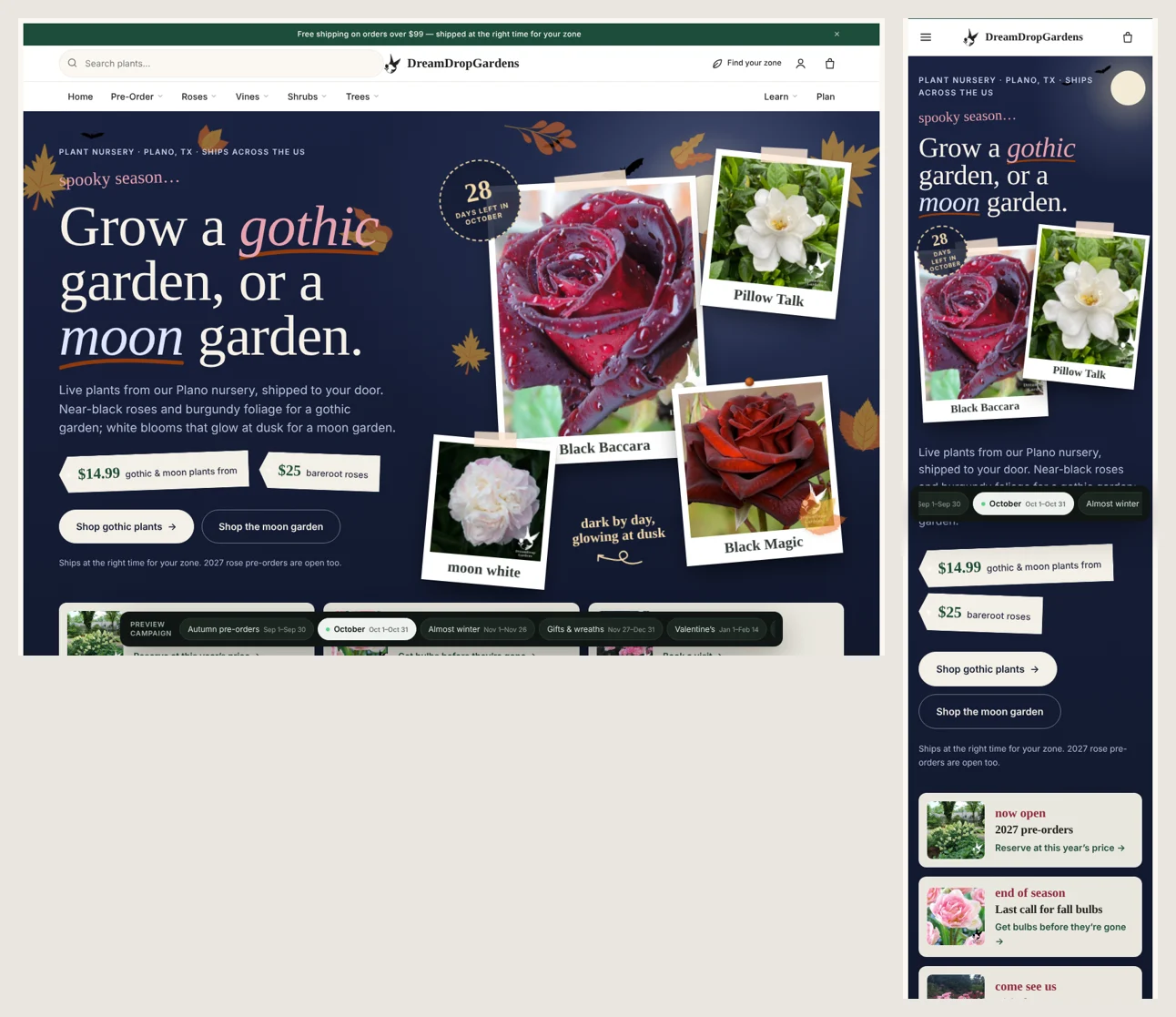
October 2026
Gothic & moon garden
October's campaign: near-black roses and burgundy foliage for a gothic garden, white blooms that glow at dusk for a moon garden. Polaroid plant cards, price tags, and a countdown of days left in the month — and a campaign preview that lines up the season ahead: autumn pre-orders, October, almost winter, gifts & wreaths, Valentine's.
Phase 1
A shopper can browse the catalog, reserve a plant, pay a deposit or in full, and get a branded receipt. Staff can review, capture, fulfill, and cancel from one panel, and the owner is alerted when money arrives. Phase 1 was about correctness and reliability — polish comes next.
What comes next
Richer plant detail, a garden inspiration gallery, and brand-palette refinements.
View → cart → checkout → deposit → balance funnel tracking, plus ad attribution.
Demand vs. allocation by variety and season, balances, expiring holds, shortfalls.
Batch balance charges and draft-to-order conversion when a season ships.
Keep Etsy and other channels consistent with the storefront catalog.
Onboard additional stores on the same template.
Difficulty & our recommendation
You take over the cart, checkout, payments, caching, image delivery, SEO, accessibility, security, hosting, and deploys — and you meet Shopify's hard edges: global inventory policies, emails that can't see certain data, silently hidden metafields, silently ignored filters, and a draft order that refuses to become an order.
For a simple store
Probably not.
In-stock products and a normal checkout? A good Shopify theme gets you to market faster and cheaper, and Shopify maintains it for you.
For a complex ordering model
Yes — real value.
Seasonal pre-orders, deposits, authorize-then-capture, per-variety caps, two brands on one backend, and specialist plant data are things a theme can't express. Keeping Shopify meant we didn't rebuild inventory, orders, accounts, tax, email, or the CDN.
Use Shopify for what it does well, and build your own layer only where your business is different. For DreamDrop Gardens, that layer is the reason the business works.
Outgrowing your Shopify theme?
If your ordering model doesn't fit a stock theme — pre-orders, deposits, multiple brands, specialist product data — let's talk about what a custom storefront could look like.